
CRUD
The zero framework lets you manage RESTful endpoints with custom handlers. You can combine them with built-in services to handle Create, Read, Update, and Delete operations.
try app.get("/todos", handler.getAll);

try app.get("/todos/:id", handler.getTodo);

try app.post("/todos", handler.persistTodo);

try app.put("/todos/:id", handler.updateTodo);

try app.delete("/todos/:id", handler.deleteTodo);
Example
Look at the zero-htmx-todo example to see how the CRUD operations work end to end.
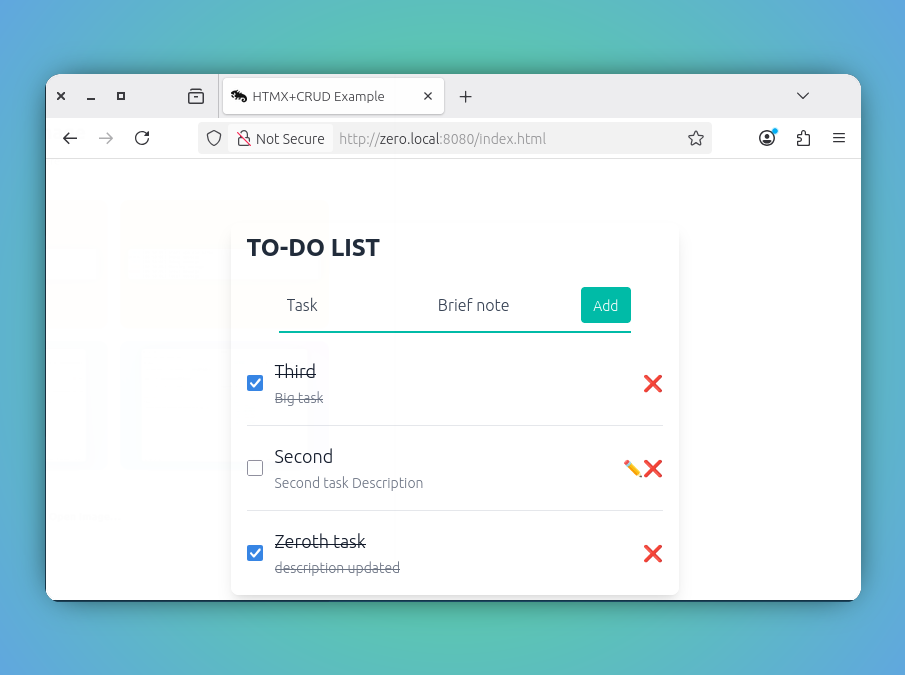
This example ships a working htmx frontend for a to-do app. It lets you perform these operations:
- Add one or more
todotasks withPOST - Update a
taskand itsdescriptionwithPUT - View one or more tasks with
GET - Mark a
taskdone withPOST - Delete a
taskyou no longer want withDELETE
The htmx frontend lives in the static directory and is served automatically at :8080/index.html.
Because this example uses CRUD operations, it stores data in the demo database. Check config/.env for the settings. The app runs migrations on startup and creates the tables your CRUD operations need.
const std = @import("std");
const zero = @import("zero");

const models = @import("models.zig");
const migrations = @import("migrations/all.zig");
const handler = @import("handler.zig");

const App = zero.App;
const Context = zero.Context;
const migrate = zero.migrate;
const container = zero.container;
const utils = zero.utils;
const dateTime = zero.zdt.Datetime;

pub const std_options: std.Options = .{
    .logFn = zero.logger.custom,
};

pub fn main(init: std.process.Init) !void {
    var arean = std.heap.ArenaAllocator.init(
        std.heap.page_allocator,
    );
    defer arean.deinit();

    const allocator = arean.allocator();

    const app = try App.new(allocator, init.io, init.environ_map);

    try migrations.all(app);

    try app.runMigrations();

    try app.get("/todos", handler.getAll);

    try app.get("/todos/:id", handler.getTodo);

    try app.post("/todos", handler.persistTodo);

    try app.put("/todos/:id", handler.updateTodo);

    try app.delete("/todos/:id", handler.deleteTodo);

    try app.post("/done/:id", handler.markDone);

    try app.post("/undone/:id", handler.markUndone);

    try app.run();
}APP_ENV=dev
APP_NAME=zero-todo-htmx
APP_VERSION=1.0.0
LOG_LEVEL=info
DB_HOST=localhost
DB_USER=user1
DB_PASSWORD=password1
DB_NAME=demo
DB_PORT=5432
DB_DIALECT=postgresRead the full example to see how it fits together.
- Let's look at how the
customhandlers implement theCRUDoperations.
pub fn getAll(ctx: *Context) !void {
    var _rows = std.array_list.Managed(models.Todo).init(ctx.allocator);
    _ = try ctx.SQL.selectSlice(ctx, models.Todo, &_rows, models.getAllTodos, .{});

    var responses = std.array_list.Managed(
        models.HandlerTodo,
    ).init(
        ctx.allocator,
    );

    for (_rows.items) |row| {
        const response = models.HandlerTodo{
            .id = try std.fmt.allocPrint(ctx.allocator, "{d}", .{row.id.?}),
            .description = row.description,
            .task = row.task,
            .isDone = row.is_done,
            .created_at = try utils.DTtimestampz(
                ctx.allocator,
                row.created_at,
            ),
        };

        try responses.append(response);
    }

    const list = try helper.itemList(ctx, responses);

    ctx.response.content_type = .HTML;
    ctx.response.setStatus(.ok);
    ctx.response.body = list;
}pub fn persistTodo(ctx: *Context) !void {
var t: models.Todo = undefined;
if (try ctx.bind(models.Todo)) |todo| {
t = todo;
}
// persist todo entry in database
const id = try ctx.SQL.exec(ctx, models.addTodoEntry, .{ t.task, t.description });
if (id) |_id| {
const status = try utils.toStringFromInt(
ctx.allocator,
"{d} task persisted",
_id,
);
ctx.info(status);
}
const row: ?models.Todo = try ctx.SQL.select(
ctx,
models.Todo,
models.getTodoEntry,
.{},
);
var response = models.HandlerTodo{
.id = try std.fmt.allocPrint(
ctx.allocator,
"{d}",
.{row.?.id.?},
),
.description = row.?.description,
.task = row.?.task,
.isDone = row.?.is_done,
};
response.created_at = try utils.DTtimestampz(
ctx.allocator,
row.?.created_at,
);
ctx.response.setStatus(.ok);
ctx.response.header("HX-Refresh", "true");
}pub fn updateTodo(ctx: *Context) !void {
const todoID = ctx.param("id");
const t = try ctx.bind(models.Todo);
// persist todo entry in database
const id = try ctx.SQL.exec(
ctx,
models.updateTodo,
.{ t.?.task.?, t.?.description.?, todoID },
);
if (id) |_id| {
const status = try utils.toStringFromInt(
ctx.allocator,
"{d} task updated",
_id,
);
ctx.info(status);
}
const row: ?models.Todo = try ctx.SQL.select(
ctx,
models.Todo,
models.getTodoByID,
.{todoID},
);
var response = models.HandlerTodo{
.id = try std.fmt.allocPrint(
ctx.allocator,
"{d}",
.{row.?.id.?},
),
.description = row.?.description,
.task = row.?.task,
.isDone = row.?.is_done,
};
response.created_at = try utils.DTtimestampz(
ctx.allocator,
row.?.created_at,
);
var sb = Builder.init(ctx.allocator);
try helper.innerHtmlItem(ctx.allocator, &sb, &response);
ctx.response.content_type = .HTML;
ctx.response.setStatus(.ok);
ctx.response.body = sb.string();
}pub fn deleteTodo(ctx: *Context) !void {
const id = ctx.param("id");
ctx.info(id);
const row = ctx.SQL.queryRow(
ctx,
models.Todo,
models.getTodoByID,
.{id},
) catch |err| {
ctx.response.setStatus(.internal_server_error);
ctx.err("something went wrong!");
ctx.any(err);
return;
};
if (row == null) {
const msg = try utils.toString(
ctx.allocator,
"No valid data found for id: {s}",
id,
);
ctx.info(msg);
ctx.response.setStatus(.not_found);
ctx.response.header("HX-Refresh", "true");
return;
}
_ = try ctx.SQL.exec(ctx, models.deleteTodo, .{id});
ctx.response.setStatus(.ok);
ctx.response.header("HX-Refresh", "true");
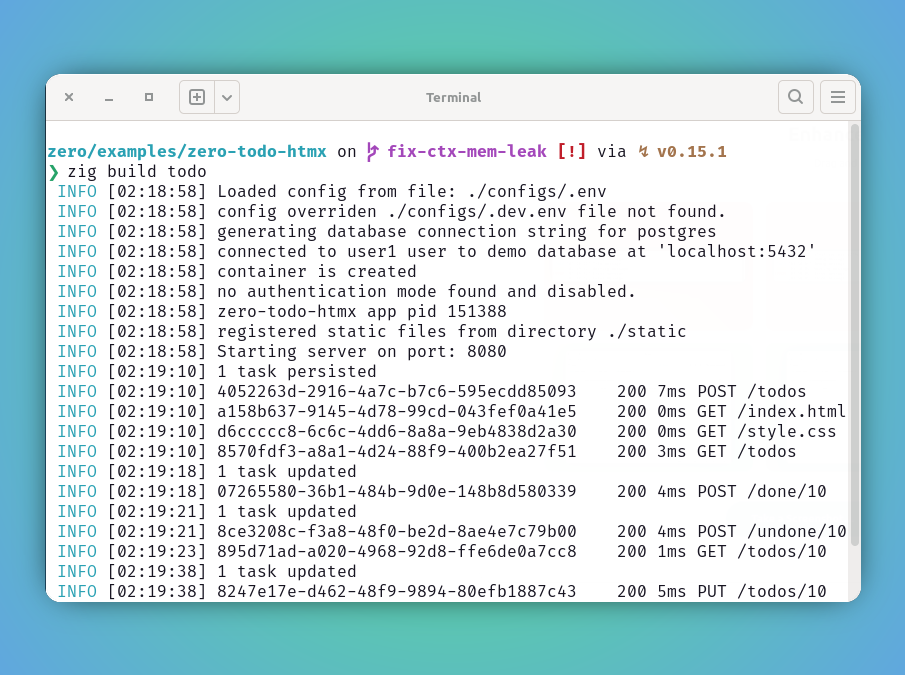
}- Let's build and run the app.
zero/examples/zero-todo-htmx on main [!] via ↯ v0.15.1
❯ zig build todo
INFO [02:18:58] Loaded config from file: ./configs/.env
INFO [02:18:58] config overriden ./configs/.dev.env file not found.
INFO [02:18:58] generating database connection string for postgres
INFO [02:18:58] connected to user1 user to demo database at 'localhost:5432'
INFO [02:18:58] container is created
INFO [02:18:58] no authentication mode found and disabled.
INFO [02:18:58] zero-todo-htmx app pid 151388
INFO [02:18:58] registered static files from directory ./static
INFO [02:18:58] Starting server on port: 8080
INFO [02:19:10] 1 task persisted
INFO [02:19:10] 4052263d-2916-4a7c-b7c6-595ecdd85093 200 7ms POST /todos
INFO [02:19:10] a158b637-9145-4d78-99cd-043fef0a41e5 200 0ms GET /index.html
INFO [02:19:10] d6ccccc8-6c6c-4dd6-8a8a-9eb4838d2a30 200 0ms GET /style.css
INFO [02:19:10] 8570fdf3-a8a1-4d24-88f9-400b2ea27f51 200 3ms GET /todos
INFO [02:19:18] 1 task updated
INFO [02:19:18] 07265580-36b1-484b-9d0e-148b8d580339 200 4ms POST /done/10
INFO [02:19:21] 1 task updated
INFO [02:19:21] 8ce3208c-f3a8-48f0-be2d-8ae4e7c79b00 200 4ms POST /undone/10
INFO [02:19:23] 895d71ad-a020-4968-92d8-ffe6de0a7cc8 200 1ms GET /todos/10
INFO [02:19:38] 1 task updated
INFO [02:19:38] 8247e17e-d462-48f9-9894-80efb1887c43 200 5ms PUT /todos/10
INFO [02:19:42] 1 task updated
INFO [02:19:42] ef17eead-2410-4d77-afce-3d5ce58d33a8 200 3ms POST /done/10- Preview the
CRUDoperations in the running server.
Recommendation
Use the ctx allocator whenever you can. It is tied to the request life-cycle, so it frees memory automatically and avoids leaks.