
Migrations
Migrations are a common pattern for adding or changing your data model as the app evolves.
Tracking those changes by hand is tough and easy to get wrong.
To cut that pain, zero ships a built-in migrations solution.
zero now ships a CLI that automates migration creation and registration, so you no longer wire each one by hand. You scaffold a migration, fill in the SQL, and zero wires it into your app and tracks it for you.
TIP
A migration records itself in the zero_migrations table of whatever backend it targets. zero supports two targets:
relational— runs throughctx.SQL. Covers Postgres, SQLite, DuckDB, and ClickHouse.nosql— runs throughctx.NoSQL(CQL). Covers Cassandra, Couchbase, and MongoDB.
Relational migrations run inside a database transaction. If one fails, zero rolls it back and leaves it unrecorded, so it is retried on the next run (it is not silently masked as applied). NoSQL migrations have no transaction — CQL offers none, so a failed NoSQL migration is simply left unrecorded and retried next run. Only migrations that complete successfully are tracked and skipped thereafter.
Automated migration creation
The migration workflow has three steps. Only the SQL is yours to write:
- Build the
zeroCLI. - Scaffold a migration with
zero migrator add. - Register all migrations in
main.zigand run them.
1. Build the zero CLI
zero ships a small CLI to scaffold migrations. Building the framework also installs the CLI to a bin directory. The default zig build step does this, or you can run zig build zero with a prefix explicitly.
zig build zero --prefix=/usr/local/bin
# -> ./usr/local/bin/zero
2. Scaffold a migration for your app
Run the migrator add subcommand with a --name. The name is sanitized (- → _) and stamped with the current epoch as the migrationNumber.
cd app #zig app
zero migrator add --name create-users
This writes two things under src/migrations/:
create_users.zig: the migration itself (edit theTODOSQL).all.zig: regenerated automatically; it registers every migration insrc/migrations/. You never edit this file by hand.
The generated create_users.zig looks like:
❯ zero migrator add --name create-users
Created migration: src/migrations/create_users.zig (migrationNumber = 1760947008)
Updated: src/migrations/all.zig

# Make sure to invoke the all migrations.
try migrations.all(app);

# To run migrations add this line
try app.runMigrations();const std = @import("std");
const zero = @import("zero");
const Context = zero.Context;
const migrate = zero.migrate;
pub const migrationNumber: i64 = 1760947008;
pub fn create_users_run(c: *Context) anyerror!void {
const query =
\\ -- TODO: write your migration SQL
;
_ = try c.SQL.exec(c, query, .{});
}
pub const _migrate = &migrate{
.migrationNumber = migrationNumber,
.run = create_users_run,
.target = .relational, // .relational (ctx.SQL) or .nosql (ctx.NoSQL)
};Edit the TODO line with your DDL/DML. Each migration's run executes inside a transaction (for relational backends), so keep it concise and executable.
The .target field decides which handle the migration runs through. It defaults to .relational; set it to .nosql to run CQL through ctx.NoSQL instead.
SQL dialect support
The relational target adapts its DDL to the configured DB_DIALECT:
- postgres → Postgres DDL, with
$1,$2,...binds and apg_advisory_lockthat serializes runs across replicas. - sqlite / duckdb → SQLite-shaped DDL with
?placeholders (DuckDB reuses SQLite's syntax here). - clickhouse →
MergeTreeengine (ENGINE = MergeTree() ORDER BY epoch), because ClickHouse has no transactions and needs an explicit engine.
NoSQL target example
For a wide-column store you set .target = .nosql and write CQL through ctx.NoSQL. The migration records itself in a zero_migrations table it creates for you.
const std = @import("std");
const zero = @import("zero");
const Context = zero.Context;
const migrate = zero.migrate;

pub const migrationNumber: i64 = 1760947008;

pub fn create_users_nosql_run(c: *Context) anyerror!void {
    // query() runs arbitrary CQL and returns the result as a JSON array.
    // Free it; migrations run on the app allocator, not the request allocator.
    const result = try c.NoSQL.query(c,
        \\ CREATE TABLE IF NOT EXISTS zero_migrations (
        \\   epoch bigint, execution text, start_time text, duration bigint,
        \\   PRIMARY KEY (epoch)
        \\ )
    );
    c.allocator.free(result);
}

pub const _migrate = &migrate{
    .migrationNumber = migrationNumber,
    .run = create_users_nosql_run,
    .target = .nosql,
};
Because CQL has no transactions, a failed NoSQL migration is left unrecorded rather than rolled back, and retried on the next run.
The regenerated src/migrations/all.zig collects every migration for you:
const std = @import("std");
const Self = @This();
const migrations = @This();
const zero = @import("zero");

const App = zero.App;
const migrate = zero.migrate;
const utils = zero.utils;

const create_users = @import("create_users.zig");

pub fn all(app: *App) !void {
    try app.addMigration(try Key(app, create_users._migrate), create_users._migrate);
}

fn Key(app: *App, m: *const migrate) ![]const u8 {
    return try utils.toStringFromInt(app.container.allocator, "{d}", m.migrationNumber);
}
TIP
Run zero migrator add again to add another migration. all.zig is regenerated each time. Re-adding a name that already exists is rejected, so you can't clobber an existing migration by accident.
3. Register and run
In main.zig, import the generated migrations module and call migrations.all(app) before app.runMigrations(). Order doesn't matter; zero sorts by migrationNumber when it runs.
const std = @import("std");
const zero = @import("zero");

const App = zero.App;
const migrations = @import("migrations/all.zig");

pub const std_options: std.Options = .{
    .logFn = zero.logger.custom,
};

pub fn main(init: std.process.Init) !void {
    var gpa: std.heap.DebugAllocator(.{}) = .init;
    const allocator = gpa.allocator();
    _ = gpa.detectLeaks();

    const app: *App = try App.new(allocator, init.io, init.environ_map);

    migrations.all(app);
    try app.runMigrations();

    try app.run();
}APP_ENV=dev
APP_NAME=zero-migration
APP_VERSION=1.0.0
LOG_LEVEL=debug
DB_HOST=localhost
DB_USER=user1
DB_PASSWORD=password1
DB_NAME=demo
DB_PORT=5432
DB_DIALECT=postgresBuild and run. On the first run the migrations execute. On every later run they're skipped once recorded.
❯ zig build migrations
 INFO [01:13:13] Loaded config from file: ./configs/.env
 INFO [01:13:13] config overriden ./configs/.dev.env file not found.
 INFO [01:13:14] generating database connection string for postgres
 INFO [01:13:14] connected to user1 user to demo database at 'localhost:5432'
 INFO [01:13:14] container is being created
 INFO [01:13:14] no authentication mode found and disabled.
 INFO [01:13:14] zero-migration app pid 11070
 INFO [01:13:14] 1760947008: migration completed
 INFO [01:13:14] 1760953394: migration completed
 INFO [01:13:14] registered static files from directory ./static
INFO [01:13:14] Starting server on port: 8080❯ zig build migrations
INFO [01:17:07] Loaded config from file: ./configs/.env
INFO [01:17:07] config overriden ./configs/.dev.env file not found.
INFO [01:17:08] generating database connection string for postgres
INFO [01:17:08] connected to user1 user to demo database at 'localhost:5432'
INFO [01:17:08] container is being created
INFO [01:17:08] no authentication mode found and disabled.
INFO [01:17:08] zero-migration app pid 11937
DEBUG [01:17:08] 1760947008: migration is skipped
DEBUG [01:17:08] 1760953394: migration is skipped
INFO [01:17:08] registered static files from directory ./static
INFO [01:17:08] Starting server on port: 8080zero_migrations
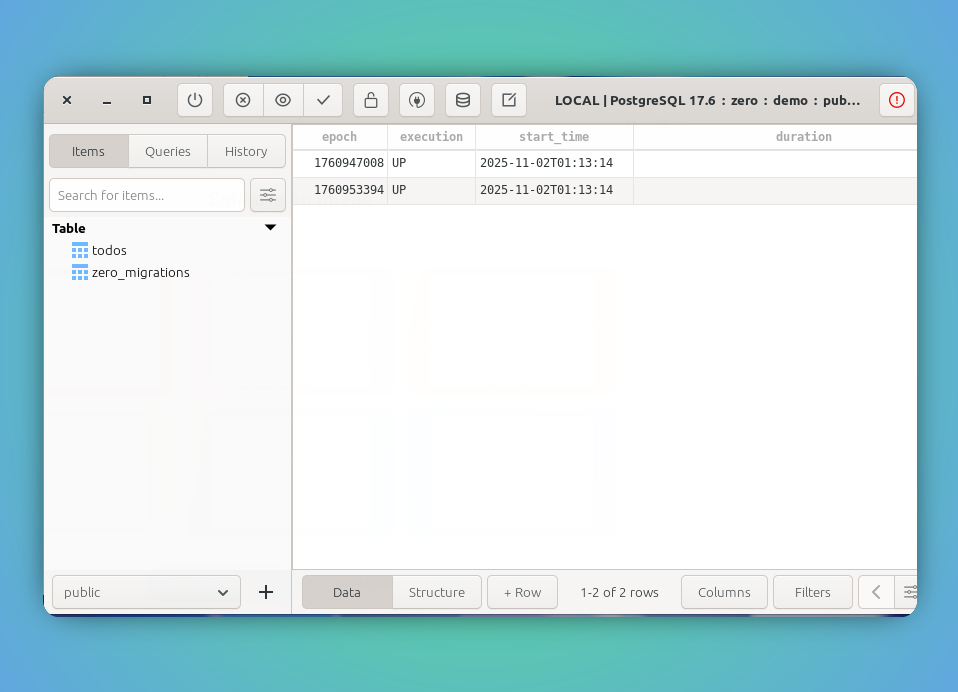
zero tracks every migration that ran successfully in the zero_migrations table, with the needed details.
If you alter or remove rows from this table, zero runs the migrations again and can corrupt your data model.
zero trusts you not to touch the rows in this table.
Recommendations
zero tracks migrations by a unique key. If you change the key, the migration runs again, but that stays under your control.
zero recommends using the epoch timestamp as the key for every migration. This command prints the key value quickly:
❯ date +%s
1660947353
Recommendation
Use the ctx allocator whenever you can. It's tied to the request life-cycle, so zero frees it for you and prevents memory leaks.